
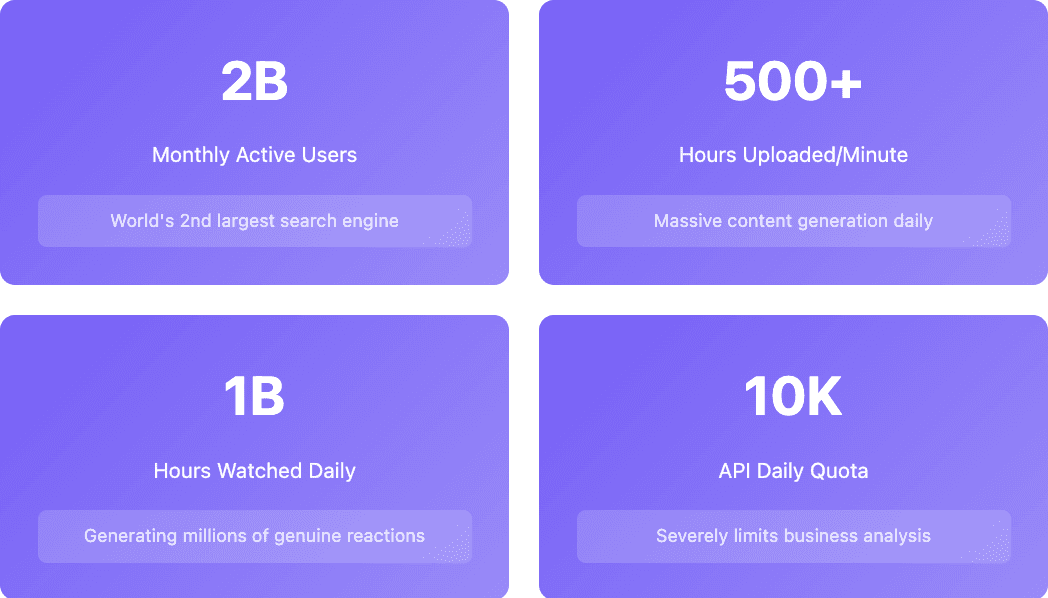
Here's the reality: Most YouTube scraper tools promise easy data extraction but fail when you actually need reliable results. The platform hosts over 2 billion monthly active users uploading 500+ hours of content every minute, creating a massive data goldmine. The problem? YouTube's anti-bot measures have become incredibly sophisticated, and the official API comes with quota restrictions that make serious business analysis nearly impossible.
The difference between tools that work and those that disappoint comes down to understanding YouTube's restrictions and choosing the right approach for your specific needs.
Why YouTube Data Actually Matters for Your Business
YouTube isn't just entertainment. It has become the world's second-largest search engine and a critical source of business intelligence. Think about it: over 1 billion hours of video get watched daily, generating millions of genuine comments, reactions, and discussions that reveal what people really think about products, services, and trends.
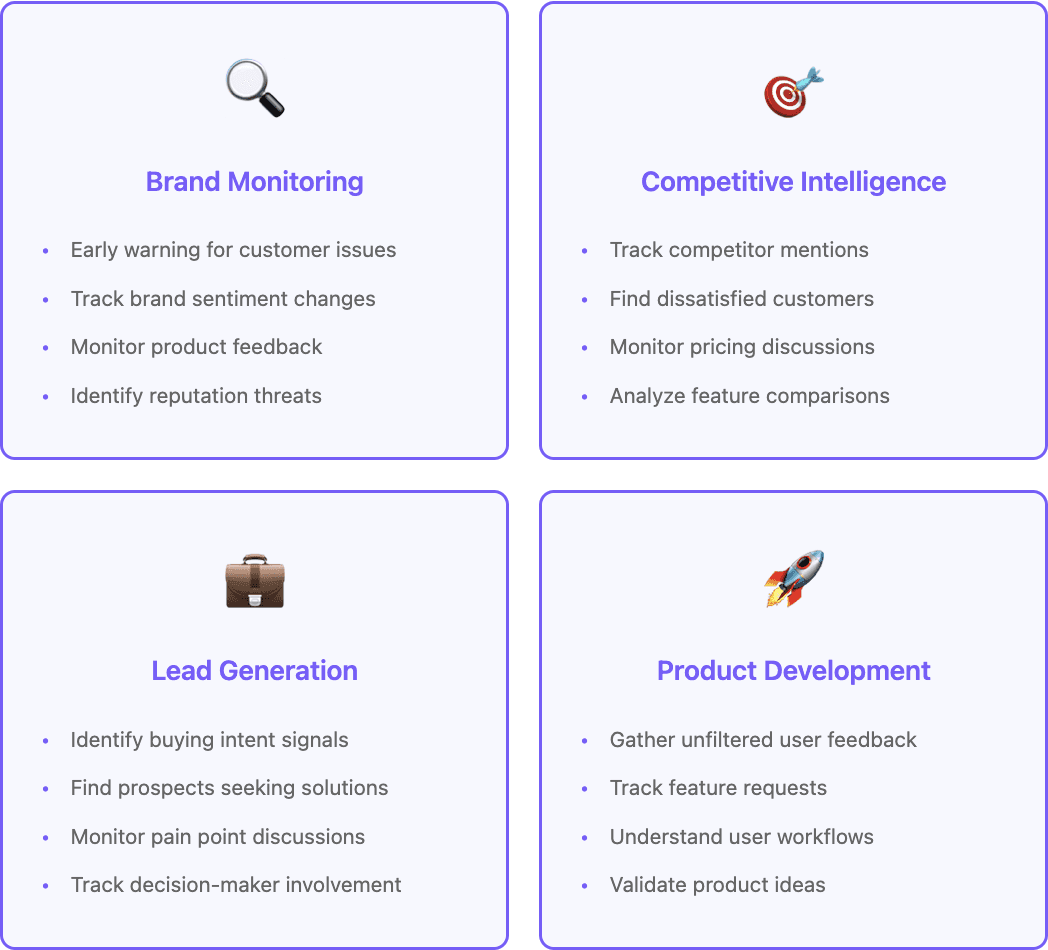
Content creators monitor YouTube data to understand what resonates with audiences and identify trending topics before they explode. The difference between viral content and content that flops often comes down to recognizing these patterns early.
Marketing teams use YouTube discussions to track brand mentions and analyze competitor content performance. A single viral video can generate more authentic brand awareness than months of traditional advertising, but only if you know how to identify and learn from successful patterns.
Market researchers particularly value YouTube comments because they contain unfiltered opinions about products and services. Unlike survey responses, YouTube comments represent genuine reactions from users who aren't being paid to share their thoughts.
The challenge? Manual monitoring becomes impossible at scale, while YouTube's official API has severe limitations that make comprehensive analysis difficult for most business use cases.
YouTube's Data Goldmine (And Why It's So Hard to Access)
YouTube contains several types of valuable data, but accessing each type requires different approaches and comes with distinct challenges.
Video metadata includes titles, descriptions, view counts, upload dates, and engagement metrics. This data helps you understand content performance and trending topics across different niches.
Comment data represents the most valuable source of audience sentiment. Comments reveal genuine reactions, questions, and suggestions that help creators and businesses understand their audience's true feelings.
Channel analytics show creator growth patterns and content strategies over time. This information helps identify successful creators for partnerships or understand competitive positioning.
Search results data reveals what content appears for specific keywords, perfect for competitive analysis and content gap identification.
But here's where things get tricky. YouTube's official API limitations create significant barriers. The platform provides a default quota of 10,000 units per day. Sounds generous, right? Wrong. A single video search costs 100 units, meaning you can only perform 100 searches daily before hitting limits.
Comment extraction costs 1 unit per 100 comments, but when you factor in video details and channel information, a typical competitive analysis can consume your entire daily quota quickly. Need more quota? You'll have to complete compliance audits that can take weeks or months to approve, if they approve at all.
How to Extract YouTube Data with Databar (The Smart Way)
Databar turns YouTube data extraction from a technical nightmare into a straightforward business intelligence workflow. No API quotas to worry about, no complex coding required, and you get enriched data that's actually useful for business decisions.
Getting YouTube Comments in 2 Minutes
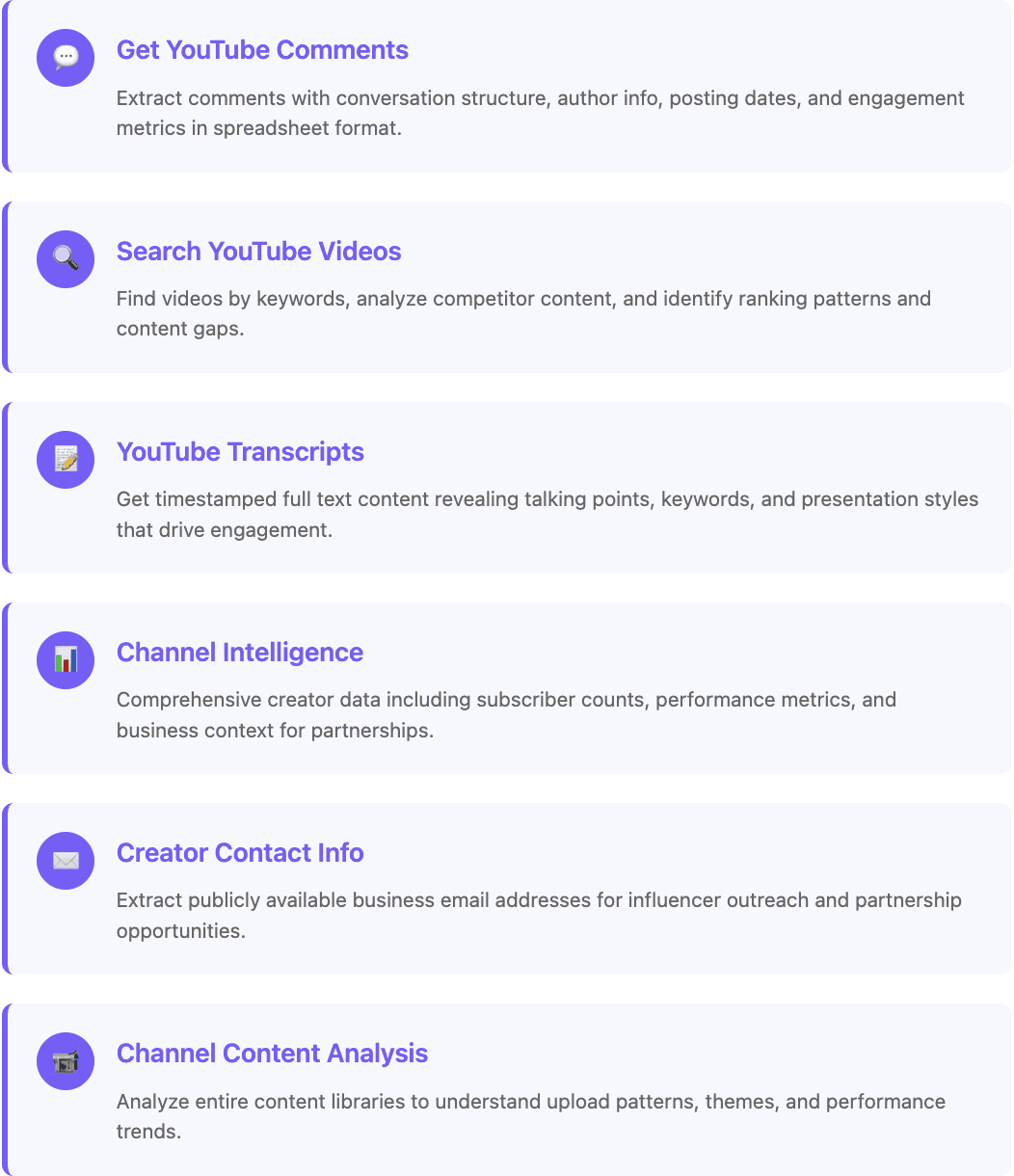
Head to the Databar.ai catalog and search for "Youtube”. Look for the "Get YouTube comments" option, marked with the familiar red YouTube logo.
The setup couldn't be simpler. Paste any YouTube video URL into the field, and Databar automatically handles everything else. No API keys, no technical configuration, no quota management headaches.
The system extracts comments while preserving the conversation structure that makes YouTube discussions valuable. You get comment text, author information, posting dates, like counts, and reply threads organized in a clean spreadsheet format.
Want to analyze competitor videos? Brand mentions? Product reviews? Just paste the URL and let Databar do the work.
Finding Videos with YouTube Search
The "Search YouTube videos" reveals which videos dominate specific keywords in your industry. Access it through the same enrichment menu.
Enter keywords relevant to your business or competitors, and you'll get back video titles, descriptions, view counts, channel information, and ranking positions. This shows you exactly what content strategies work in your niche.
The data reveals content gaps where audience demand exists but isn't being served well. You can identify which types of titles generate the most views, what description formats correlate with higher engagement, and which channels dominate your keywords.
Extracting Video Transcripts for Content Analysis
"YouTube transcripts" provides the full text content of videos, perfect for understanding what successful creators actually say in their content.
Enter a video URL, and get back timestamped transcripts that reveal the exact talking points, keywords, and presentation style that drives engagement. This transforms video analysis from time-consuming manual watching to quick data extraction.
Getting Channel Intelligence
"YouTube channel details" provides comprehensive information about content creators, which is what you want for partnership research or competitive analysis.
Enter a channel URL and get back subscriber counts, video statistics, channel creation dates, and detailed performance metrics. The system automatically identifies business context when available.
Accessing Creator Contact Information
"Get YouTube channel email" extracts publicly available contact information for outreach and partnership opportunities.
Many creators include business email addresses in their channel information. This enrichment automatically identifies and extracts these contacts, saving hours of manual research for influencer marketing campaigns.
Complete Channel Content Analysis
"Get YouTube channel videos" provides comprehensive data about a creator's entire content library.
Analyze upload patterns, content themes, and performance trends across a creator's full catalog. This reveals which content types work best for specific audiences and identifies collaboration opportunities.
The Advanced YouTube Influencer Outreach Workflow
Here's where things get really interesting. You can combine multiple YouTube data sources to create comprehensive influencer marketing campaigns that actually work. Let me walk you through a complete workflow that's generated incredible results for influencer partnerships.
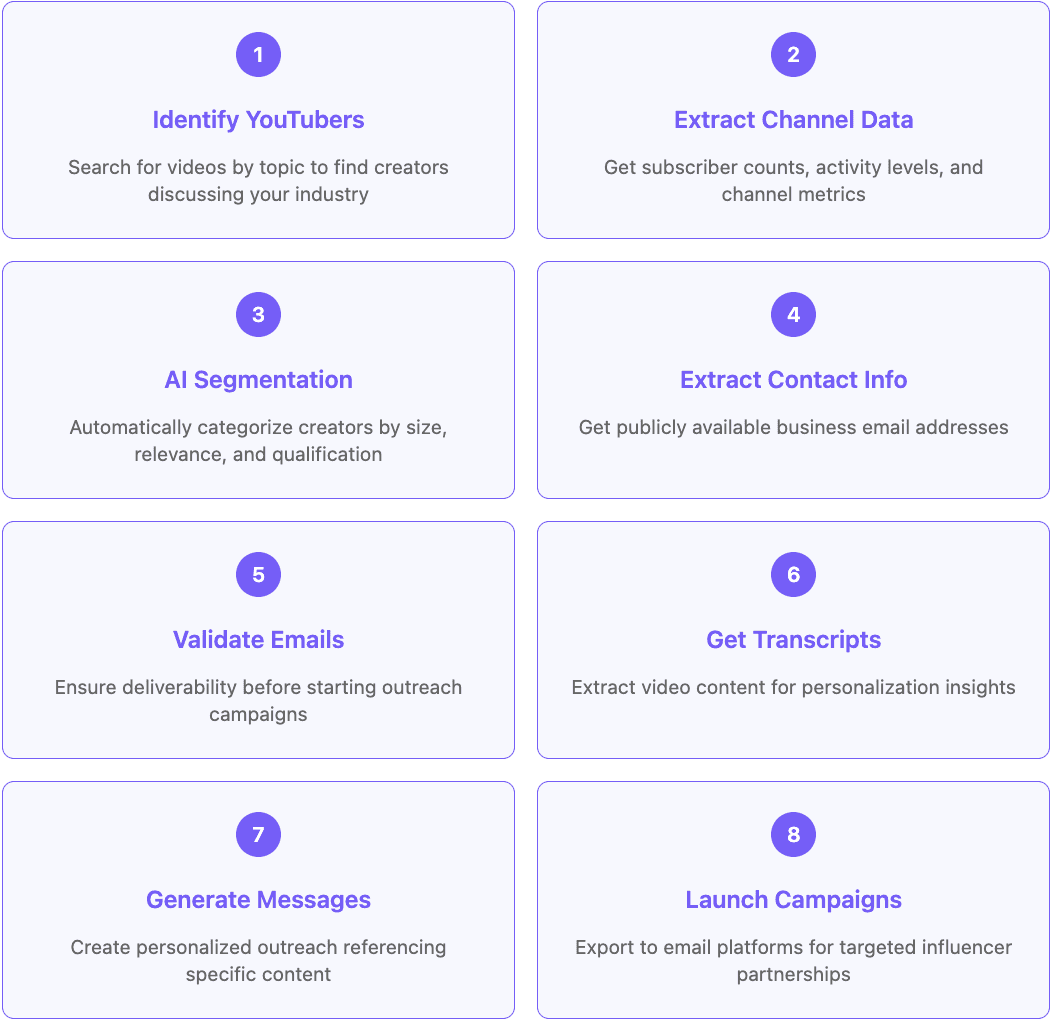
Step 1: Identify Relevant YouTubers by Topic
Start by creating a new table and selecting "Search YouTube videos." Enter keywords related to your product or industry. For example, if you're marketing productivity software, search for "productivity apps review" or "workflow optimization."
This initial search returns videos discussing your target topic along with channel information for each creator. You'll get video titles, view counts, engagement metrics, and most importantly, channel URLs for further analysis.
Step 2: Extract Comprehensive Channel Data
Click "Add Enrichment" and select "YouTube channel details." Map this to the channel URLs from your search results. This enrichment pulls detailed information about each creator including subscriber counts, total video views, channel creation dates, and recent activity levels.
Now you have the foundation data needed to segment creators based on your partnership criteria.
Step 3: Use AI to Segment and Qualify Creators
Add another enrichment column and select "Use AI." Create a custom prompt that analyzes the channel data and segments creators based on your specific requirements:
*"Analyze this YouTube channel data and categorize the creator based on these criteria:
Channel size: Micro (1K-10K), Mid-tier (10K-100K), Macro (100K+)
Channel age: New (less than 2 years), Established (2-5 years), Veteran (5+ years)
Relevance: High, Medium, Low based on subscriber count and topic alignment
Overall qualification: Qualified/Not Qualified for partnership
Channel data: Subscribers: {{subscriber_count}}, Created: {{channel_created}}, Total views: {{total_views}}"*
This AI analysis automatically categorizes each creator, making it easy to focus on qualified prospects who match your partnership criteria.
Step 4: Extract Creator Contact Information
For qualified creators, add "Get YouTube channel email" enrichment. This automatically extracts publicly available contact information that creators include in their channel descriptions or about sections.
Many successful YouTubers include business email addresses specifically for brand partnerships. This step eliminates hours of manual research trying to find creator contact information.
Step 5: Validate Email Addresses
Add email validation using "Verify emails and phone numbers" enrichment. This connects to professional validation services like ZeroBounce to ensure the email addresses are deliverable before you start outreach.
Invalid emails kill outreach campaigns before they start. This validation step ensures your partnership requests actually reach creators instead of bouncing back.
Step 6: Get Video Transcripts for Personalization
Return to your original video data and add "YouTube transcripts" enrichment. This extracts the full spoken content from videos, giving you detailed insights into what each creator actually discusses.
The transcript data becomes the foundation for highly personalized outreach that references specific points from their content.
Step 7: Generate Personalized Outreach Messages
Use AI enrichment to create personalized outreach messages based on the video transcripts. Here's an exemplary prompt:
"Write a personalized partnership outreach email opener referencing this YouTuber's content. Keep it under 20 words and mention one specific point from their video transcript that relates to productivity or workflow optimization.
Video transcript: {{transcript_text}}
Channel name: {{channel_name}}
Make it feel genuine and show that I actually watched their content."
This creates authentic, personalized outreach that demonstrates you've actually engaged with their content rather than sending generic partnership requests.
Step 8: Launch Targeted Outreach Campaigns
Export your enriched data to email outreach platforms like Instantly, Smartlead, or your preferred tool. The same field-by-field discipline applies here as in any other campaign, which the outbound enrichment playbook covers in detail. You now have validated contact information, personalized messaging, and comprehensive creator intelligence for effective influencer partnerships.
This workflow typically saves hours and performs way better than generic influencer outreach because every message feels personally crafted and relevant to the creator's content.

Alternative YouTube Scraping Methods
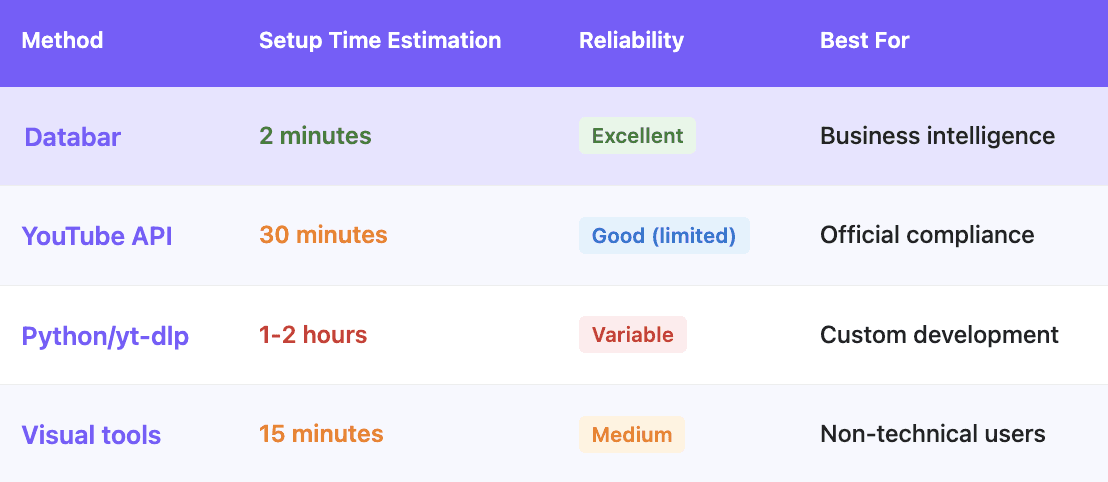
While Databar provides a great business-focused approach, several alternative methods serve different use cases, though each comes with significant limitations.
YouTube's Official API: Limited and Frustrating
YouTube's official API remains the most compliant method but has become increasingly restrictive for business applications.
Setup requires creating a Google Cloud project, enabling the YouTube Data API v3, and managing authentication credentials: easily 30-60 minutes for first-time users who haven't done this before.
The real problem? Those 10,000 daily units disappear faster than free samples at Costco. A basic competitive analysis requiring 50 video searches (5,000 units), comment extraction from 20 videos (2,000 units), and channel data for 10 competitors (1,000 units) consumes 8,000 units, or 80% of your daily quota, for minimal analysis.
Need higher quotas? Good luck with that. The audit process involves detailed compliance reviews that can take months with no guarantee of approval. Many legitimate business applications get rejected entirely for reasons that make no sense.
Python Solutions: Powerful but High-Maintenance
Developers often prefer building custom YouTube scrapers using libraries like yt-dlp, which provide more control over data extraction.
The technical approach works well if you have programming skills and time for ongoing maintenance. yt-dlp can extract video metadata and related information without API restrictions, giving you more flexibility than official channels.
But here's the catch nobody tells you about: you'll need to implement anti-detection measures, handle IP blocking, and update scripts when YouTube changes its structure. For most businesses, the maintenance overhead isn't worth the technical flexibility unless you have dedicated developers.
Visual Scrapers: Looks Easy, Breaks Often
Tools like Octoparse offer point-and-click interfaces for non-technical users. They provide pre-built templates for common YouTube tasks and don't require coding knowledge, which sounds perfect on paper.
The problem? These tools struggle with YouTube's dynamic content loading and complex data relationships. They're fine for basic extraction but fall apart when you need comprehensive business intelligence or reliable ongoing monitoring.
Monthly subscription costs often exceed the value provided, especially when you factor in the time needed to learn the tools and troubleshoot when they inevitably break after YouTube updates something.
Smart YouTube Analytics That Drive Real Business Results
Successful YouTube data extraction goes beyond simple content scraping to deliver actionable business intelligence that actually moves the needle for your business. These analytical approaches extend beyond YouTube to Facebook data analysis for complete social media intelligence.
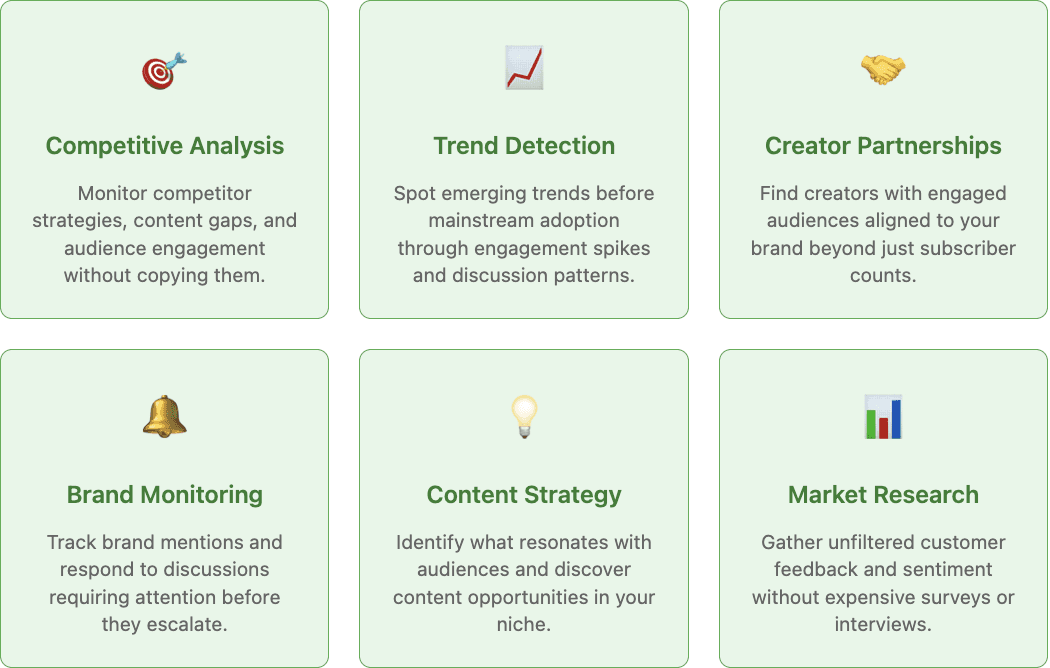
Finding What Your Competitors Are Doing Right (Without Copying Them)
Monitor competitor upload patterns, content themes, and audience engagement to understand what resonates with shared target audiences. Track which video formats generate the highest interaction and what topics drive the most meaningful discussion.
The goal isn't copying competitors. It's identifying gaps where you can serve audience needs better than existing content. Sometimes the best opportunities hide in what competitors aren't talking about rather than what they are.
Spotting Trends Before They Go Mainstream
YouTube's algorithm surfaces emerging trends through engagement spikes before they appear elsewhere. Monitor discussion patterns and engagement velocity to identify topics gaining momentum in your industry.
Early trend detection gives you weeks or months to create content around emerging themes before the market becomes saturated. This timing advantage can make the difference between leading a conversation and following it.
Finding the Right Creators for Partnerships
Look beyond subscriber counts to find creators whose audiences genuinely engage with content similar to yours. Analyze comment quality, engagement patterns, and audience response to sponsored content.
The best partnerships come from audience alignment rather than follower size. A creator with 50K engaged followers often delivers better results than one with 500K passive subscribers who barely interact with content.
Monitoring Your Brand Without Losing Sleep
Track mentions of your brand, products, or executives across YouTube content and comments. Set up workflows that alert you to discussions requiring response while filtering out noise that doesn't need attention.
Most brand mentions are neutral or positive, but the few negative ones can escalate quickly if ignored. The key is rapid response to legitimate concerns before they spiral into larger reputation issues that affect your business. Similar social listening strategies work effectively across platforms like Reddit for comprehensive brand monitoring."
Databar's YouTube Enrichments at a Glance
Every workflow in this guide is built from a handful of enrichments you can add to any Databar table. Credit prices are current as of September 2026, and billing is outcome-based, so a lookup that returns nothing is not charged:
Enrichment | Input | What you get | Credits |
|---|---|---|---|
Search YouTube videos | A search query | Matching videos | 2 |
Get YouTube video comments | A video URL | The comments on that video | 5 |
Get YouTube video transcript | A video URL | The full transcript | 2 |
YouTube channel details | A channel | Channel stats and metadata | 5 |
Get YouTube channel videos | A channel | All videos with their details | 3 |
Get YouTube channel email | A channel | The channel's contact email | 8 |
Using Comments for Audience Research
Comments are unfiltered reactions from the people you want to reach. Pull them from the review, tutorial and comparison videos in your category and you get a qualitative dataset no survey can match.
Find the questions buyers ask
Comments like "does this integrate with Salesforce?" or "how much does this cost?" show purchase intent and the objections people raise before they buy. Tag them by theme and you'll see which questions come up again and again. Those belong in your FAQ, your sales deck and your onboarding.
Borrow your customers' words
Viewers don't describe their problems in your marketing language. A comment like "I just need emails that don't bounce" is sharper copy than most taglines. Collect phrases that repeat across videos and test them in headlines, ads and cold emails.
Spot feature requests and gaps
Wishlists and complaints repeat across videos in the same category. If the same request shows up under a dozen competitor reviews, that's a validated product or positioning opportunity. If viewers keep correcting a popular video, there's room for a better one on the same topic.
Validate a topic before you make content
Before investing in a video or article, check how existing content on the topic performs. Strong views plus substantive comments mean the audience cares. Weak engagement on several attempts means it probably isn't worth the effort.
What to Do With the Transcripts
Comments tell you what the audience thinks. Transcripts tell you what the market is actually saying, in its own words, at length. Most teams pull transcripts once for outreach personalization and stop there. The bigger use is treating a batch of them as a text dataset.
Pull transcripts across 20 or 30 videos in a category and you have tens of thousands of words of unscripted talk about your space. Run them through an AI column and ask specific questions of the whole set.
Voice of customer, at length
Review and comparison videos are the closest thing to a recorded sales objection. The reviewer explains what they tried, what annoyed them, and what made them switch. That is richer than a comment because it comes with reasoning attached. Pull the transcripts of every review video in your category and tag the recurring complaints. Those are the objections your reps already hear.
Competitor messaging, as delivered
Webinars, product launches, conference talks and founder interviews are where competitors say the unpolished version of their positioning. Transcript them across a year and you can see the messaging shift: which claims got dropped, which new term started showing up, which objection they now handle in the first five minutes. That is harder to read off a website, because a website only shows you today.
Topic gaps and the words people use
Transcripts from high-performing videos show you which questions creators keep answering and how they phrase the explanation. Two things come out of that. The questions nobody answers well are your content gaps. And the phrasing that repeats across popular videos is the vocabulary your audience already uses, which usually beats the vocabulary in your marketing deck. Feed the phrasing into headlines and cold email openers the same way you would any other enrichment signal.
Tutorials as a product feedback channel
Troubleshooting and how-to videos about your product, or a competitor's, document the exact points where people get stuck. If three creators all pause to explain the same setup step, that step is confusing. If viewers keep asking for a workaround in the comments under a tutorial, the workaround is a missing feature.
Two things to watch
Auto-generated transcripts contain errors. Product names, acronyms and anything said quickly are the usual casualties. Before you quote a line or build a claim on it, open the video at the timestamp and check it. For theme-level analysis across a big batch, the occasional error washes out. For a single quote it does not.
Analysis is only as good as the question. "Summarize this transcript" gets you a summary nobody reads. "List every objection the speaker raises about pricing, with the sentence it appeared in" gets you something you can act on. Ask for the specific field you want as a column, not for a précis.
The mechanics are the same as any other enrichment. Put video URLs in a column, add the transcript enrichment, then add an AI column on top that asks your question of each transcript. The same pattern works on Reddit threads and other long-form public text, which is covered in the Reddit social listening guide.
How to Judge Real Engagement
Subscriber counts are easy to inflate and easy to misread. When you evaluate a channel for a partnership or benchmark a competitor, look at these instead:
Average views per recent video, not total channel views. It shows the reach a creator has today.
Comment-to-view and like-to-view ratios. Together they show how invested the audience is.
Consistency across recent uploads. Wild swings usually mean the channel lives on the algorithm, not on a loyal audience.
Comment quality. Specific, thoughtful comments signal a real audience. Pages of "nice video" often signal bots The same spot-check habit that keeps enrichment data honest applies to channel metrics.
After a sponsorship goes live, pull the comments on that video and count how many mention your product, ask about pricing or features, or push back. It's a far better read on the result than views alone.
Limitations to Keep in Mind
Inflated views. High view counts with little engagement often point to bot traffic, so weigh engagement ratios over raw views.
Comment spam. Filter out very short comments, repeated text and self-promotion before you analyze sentiment or themes.
Public data only. You're working with what YouTube shows publicly. Private metrics such as audience demographics or watch time stay with the channel owner.
Snapshots, not history. Each run captures numbers at that moment. To track growth, re-run the same enrichments on a schedule and compare.
Also interesting
Frequently Asked Questions
What's the easiest way to extract YouTube comments for analysis?
Databar provides the simplest approach: just paste a video URL and get structured comment data with automatic sentiment analysis and business intelligence enrichment. No coding required, no API quotas to manage, and results appear in minutes rather than hours of manual work.
Why doesn't the YouTube API work for serious business analysis?
The API's 10,000 daily unit limit restricts practical business use. A single video search costs 100 units, limiting you to 100 searches per day. Comprehensive competitive analysis or market research exhausts quotas within hours, making the API inadequate for most business applications that need real depth.
Is it legal to scrape YouTube data for business purposes?
Extracting publicly available YouTube data is generally legal under most jurisdictions for research and competitive analysis. While YouTube's terms prohibit automated access, courts consistently rule that accessing public information doesn't violate laws. Using official APIs provides the most compliant approach when possible.
What business insights can YouTube data actually provide?
YouTube analysis reveals competitor content strategies, emerging trends before mainstream adoption, customer sentiment about products and brands, influencer partnership opportunities, content gaps where demand exceeds supply, and audience engagement patterns that inform content strategy and marketing decisions.
How much does it cost to scrape YouTube data on Databar?
It is priced per lookup in credits. As of September 2026 a video transcript and a video search are 2 credits each, channel videos are 3, comments and channel details are 5, and a channel email is 8. Billing is outcome-based, so a lookup that returns nothing costs nothing. Databar plans start at $99 per month for 5,000 credits.
Can I get a YouTube creator's email address for outreach?
Yes, where the creator has published one. The channel email enrichment picks up the business address many creators list in their channel information, at 8 credits per successful lookup. Run it only on the creators that passed your qualification step, and verify the addresses before you send.
Recent articles
See all






